
Today’s focus? Choosing the right accounting software the backbone that will power all the frameworks we’ve built so far.
Why this matters:
Your software isn’t just a tool; it’s the engine that drives your multi-channel sales tracking, handles complex expense categories, and brings your detailed chart of accounts to life. The right platform will boost your operational efficiency and financial clarity for years to come.
Building on Week 1 Foundations
From mastering the eight-step order-to-cash flow to juggling a dozen expense categories, your accounting software needs to be more than basic. Research shows that e-commerce companies with fully integrated software make 90% fewer errors and close their books 40% faster than those using generic solutions.
Your ideal software must:
- Seamlessly handle multiple sales channels
- Manage inventory across diverse fulfillment centers
- Deliver real-time financial insights for swift decision-making
The wrong choice? It can seriously hold you back.
The True Cost of a Poor Software Choice
Picking the wrong software doesn’t just cause headaches it costs you money and time. Around 67% of e-commerce businesses end up switching systems, with average migration expenses ranging from $15,000 to $50,000 plus months of disruption.
Businesses that avoid these costly pitfalls share one secret: they invest the effort to select the right software from the start.
The E-commerce Accounting Software Landscape
The E-commerce Accounting Software Landscape: Choosing What Fits Your Growth
Market Leaders and Their Unique Strengths
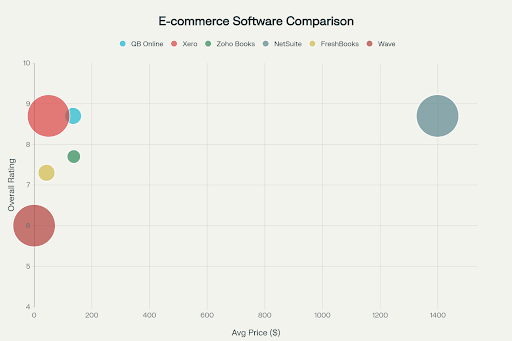
The e-commerce accounting software market is shaped by a few dominant players, each catering to different business sizes and stages:
- QuickBooks Online leads small business accounting in the US, trusted by 65% of small businesses for its ease and features.
- Xero excels internationally, offering unlimited users and robust multi-currency support, ideal for globally minded growing businesses.
- NetSuite serves enterprises with over $5 million in revenue, delivering a comprehensive ERP suite and advanced inventory and financial management.
- Zoho Books strikes a balance for budget-conscious growing companies, combining rich features with affordable pricing and integration with Zoho’s ecosystem.
Understanding these options will help you pick software with a solid ecosystem, long-term support, and scalability aligned to your business needs.
Why Integration Ecosystems Trump Features
Today’s e-commerce accounting doesn’t happen in a vacuum. The software’s ability to connect seamlessly with your sales platforms, payment gateways, inventory tools, and operational software often determines success more than native features alone.
- QuickBooks Online boasts 750+ integrations
- Xero offers over 1,000 third-party connections
These integrations automate workflows, reduce manual data entry, and give you real-time visibility to make faster, more informed decisions.
Comprehensive Software Comparison by Business Size & Revenue
| Business Size | Monthly Revenue | Recommended Software | Monthly Cost | Implementation Cost | Implementation Timeline | Key Features Needed |
|---|---|---|---|---|---|---|
| Small (0-10 employees) | Under $10K | Wave / Zoho Books | $0 – $50 | $500 – $2,000 | 1-2 weeks | Basic bookkeeping & invoicing |
| Small (0-10 employees) | $10K-$50K | QuickBooks Online / Xero | $35 – $100 | $1,000 – $5,000 | 2-4 weeks | Multi-channel sync, sales tax management |
| Medium (11-50 employees) | $50K-$250K | QuickBooks Online Plus / Xero | $99 – $150 | $3,000 – $10,000 | 1-2 months | Inventory management, reporting |
| Medium (11-50 employees) | $250K-$1M | QuickBooks Advanced / Xero | $200 – $400 | $5,000 – $15,000 | 2-3 months | Advanced reporting, multi-currency |
| Large (50+ employees) | $1M-$5M | NetSuite / Sage Intacct | $800 – $2,000 | $15,000 – $50,000 | 3-6 months | ERP features, automation |
| Large (50+ employees) | Over $5M | NetSuite ERP / Custom Solutions | $2,000+ | $50,000 – $150,000+ | 6-12 months | Custom workflows, advanced analytics |
Integration & Automation Tools: Making Multi-Channel Accounting Work
Marketplace Integration Specialists
A2X specializes in Amazon and eBay, automating complex marketplace settlement reports into clean accounting entries.
- Monthly cost: $29-$99
- Saves 15-20 hours/week by automating reconciliation
- 99% accuracy vs. 60-70% manual
Synder offers a broader spectrum with support for 30+ sales channels and payment gateways.
- Monthly cost: $25-$65
- Real-time syncing, inventory updates, flexible posting options
Custom Integration Development
Enterprises with unique needs often opt for bespoke solutions at $2,000-$10,000/month, providing unlimited flexibility but requiring heavy technical resources.
Implementation: Costs, Phases & Best Practices
Breaking Down Costs
Implementation costs extend well beyond monthly software fees. Key components include:
- Software licensing and setup
- Data migration and customization
- Integration development and testing
- Staff training and change management
- Ongoing support and maintenance
Small businesses spend roughly $2,000-$10,000, whereas larger enterprises can invest upwards of $50,000-$150,000.
Phased Rollout for Success
A staged deployment limits disruption:
- Phase 1: Core accounting setup & primary sales channels (2-4 weeks)
- Phase 2: Secondary sales channels & advanced features (4-8 weeks)
- Phase 3: Advanced reporting & optimizations
Phased implementations result in 60% fewer post-launch issues than big-bang deployments.
How to Decide: Key Criteria for Software Selection
Assess Your Business Profile
Consider revenue, complexity, team size, and growth trajectory.
- <$50K revenue? Start with Wave or entry-level Zoho Books.
- $1M revenue? Look into NetSuite or advanced QuickBooks.
Analyze Integration Needs
If selling on 3+ channels, plan for integration tools like A2X or Synder, adding $300-$1,200 annually but saving hours weekly.
Factor Support & Training
Quality support is critical. QuickBooks offers 24/7 live help; Xero relies more on community and third-party resources. Bookkeeping support becomes vital as you scale.
Plan for Growth
Choose software that scales without forcing costly migrations businesses that outgrow software in <2 years face 40% higher operational costs and 25% more compliance risks.
Choosing the right e-commerce accounting software is a strategic decision that underpins every financial operation and growth plan. Equip your business with the right tools today to build the scalable, automated, and insightful finance system your future demands.
Here’s a polished and detailed rewrite of the content that keeps the depth intact and flows well for readers:
Compliance and Security: The Non-Negotiables for E-commerce Accounting Software
E-commerce businesses operate in a web of complex compliance rules spanning multiple jurisdictions. Your accounting software isn’t just a bookkeeping tool it’s your frontline defense for regulatory adherence and data security.
- Sales Tax Compliance: Your platform must seamlessly handle tax calculations and filings across all relevant states and countries, minimizing costly errors and audits.
- Audit Trails: Robust, immutable logs are essential to verify compliance and prepare for any regulatory scrutiny.
- Data Security: Look for SOC 2 certified solutions that protect sensitive financial data with bank-grade encryption and continuous monitoring.
- Role-Based Access: Fine-grained control over who can view or edit financial data ensures operational security and accountability within your team.
Security breaches don’t just risk data they cost money and disrupt business. The average direct financial loss for a breach in accounting systems hits $187,000 not to mention downtime and reputation damage. Prioritize software with proven security credentials and compliance certifications to protect your hard-earned revenue and customer trust.
Strategic Implementation: Planning for a Smooth Transition
Data Migration and Historical Records
A successful software implementation is grounded in careful data migration. Expect 2-4 weeks dedicated solely to moving your data, followed by thorough testing to guarantee integrity. Key areas include:
- Mapping your existing Chart of Accounts to the new software structure
- Migrating all historical transaction data with accurate categorization
- Importing customer and vendor records complete with contact information
- Transferring inventory data with up-to-date valuations
Proper migration preserves your financial history, avoids costly data loss, and ensures continuous reporting without disruption.
Training and Change Management
Implementation isn’t complete without user adoption. Allocate ample time for training based on system complexity:
- Complex ERPs like NetSuite demand 20-40 hours of training per user
- User-friendly platforms like QuickBooks Online typically require 5-10 hours
Organizations that invest in structured training programs see 85% user adoption within 30 days, compared to just 45% for informal approaches. Training isn’t a luxury it’s critical for maximizing your software investment and ensuring accurate, efficient workflows.
Making Your Final Decision
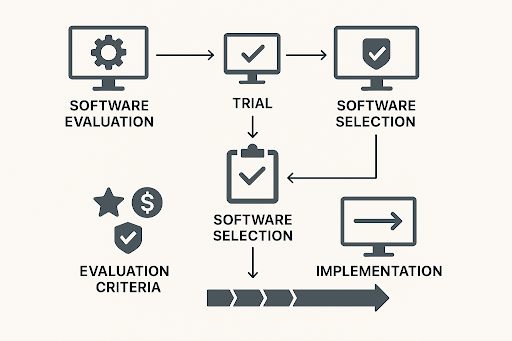
Evaluation and Trial Process
Most providers offer 30-day free trials a golden opportunity to test software in your real-world environment. Focus on critical workflows:
- Integration with your sales channels
- Transaction processing accuracy
- Financial reporting capabilities
- User interface usability
Create a tailored evaluation checklist weighted by your business priorities. Involve key stakeholders and document findings to support an informed, confident final choice.
Calculating ROI
The right software pays for itself quickly. Measure ROI through:
- Time saved via automation and reduced manual entry
- Costs avoided by minimizing errors and compliance risks
- Improved decision-making thanks to real-time financial insights
- Scalability benefits supporting future business growth
E-commerce businesses typically see a 3:1 ROI within the first year, making quality software an investment — not just an expense. Free or underpowered options rarely deliver this level of value.